This is a solution to a bug I’ve encountered in Azure Data Studio when trying to create new connections. that leads to an error message of cannot create property ‘groupid’ on string ‘.
File this post under “things I couldn’t find a neat answer to in Google so I figure I’d best create a page for it”.
I hit this issue today whereby I couldn’t create new connections in Azure Data Studio. Connecting a single query worked, I was confident I had the needed permissions the (same connection was working in SSMS) but the option to create a whole new connection so I could make it appear in the servers list failed every time.
Even a full uninstall and re-install of Azure Data Studio failed to fix the issue, something was being persisted outside of the normal stored data.
Careful reading of the error message led me to noticing that the extended details of the error were referring to a login for the server on a past project I’d deleted, which in turn set me digging in to the configuration options and finally to a fix. Here are the steps I followed.
Firstly open up settings either from the cog icon in the bottom left of the ADS window or through the ‘ctrl + ,’ shortcut.
In the search box for settings enter ‘connection groups’ which should lead you to a setting named ‘Datasource: Connection Groups’ and a hyperlink to eddit some settings json. Click on this and you’ll see some details like the following.
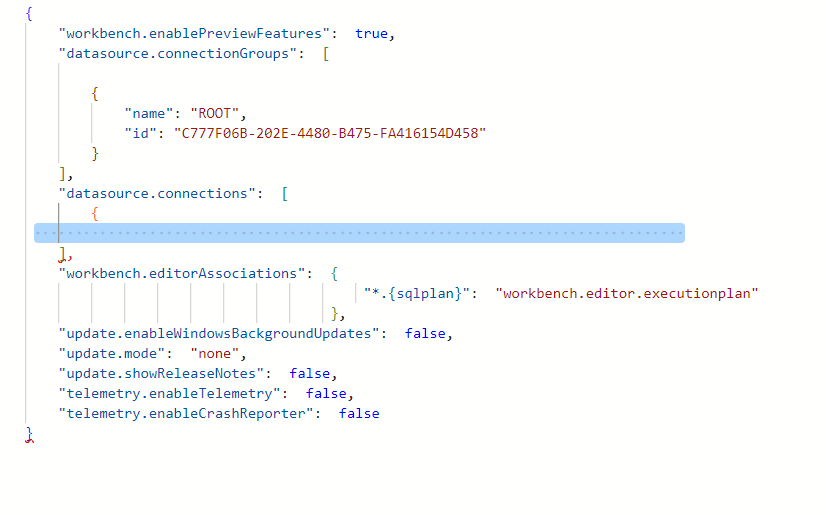
The blue highlighted section is where your connection data lives (I’ve deleted the actual data so you’re not tempted to peek at my test servers). For me there was an additional orphaned block giving a group but no connection details the highlighted XXXXX below had some metadata including the login for the long dead project that had appeared in the error.

Deleting out the group block and saving the config restored my Data Studio to functionality and once it was gone I could create a new connection in a new group without issue
 Barney Lawrence - A Blog